

Configuration is how the event runs. Event Page is what the public sees. Scorekeeper access or higher is required to change anything here.
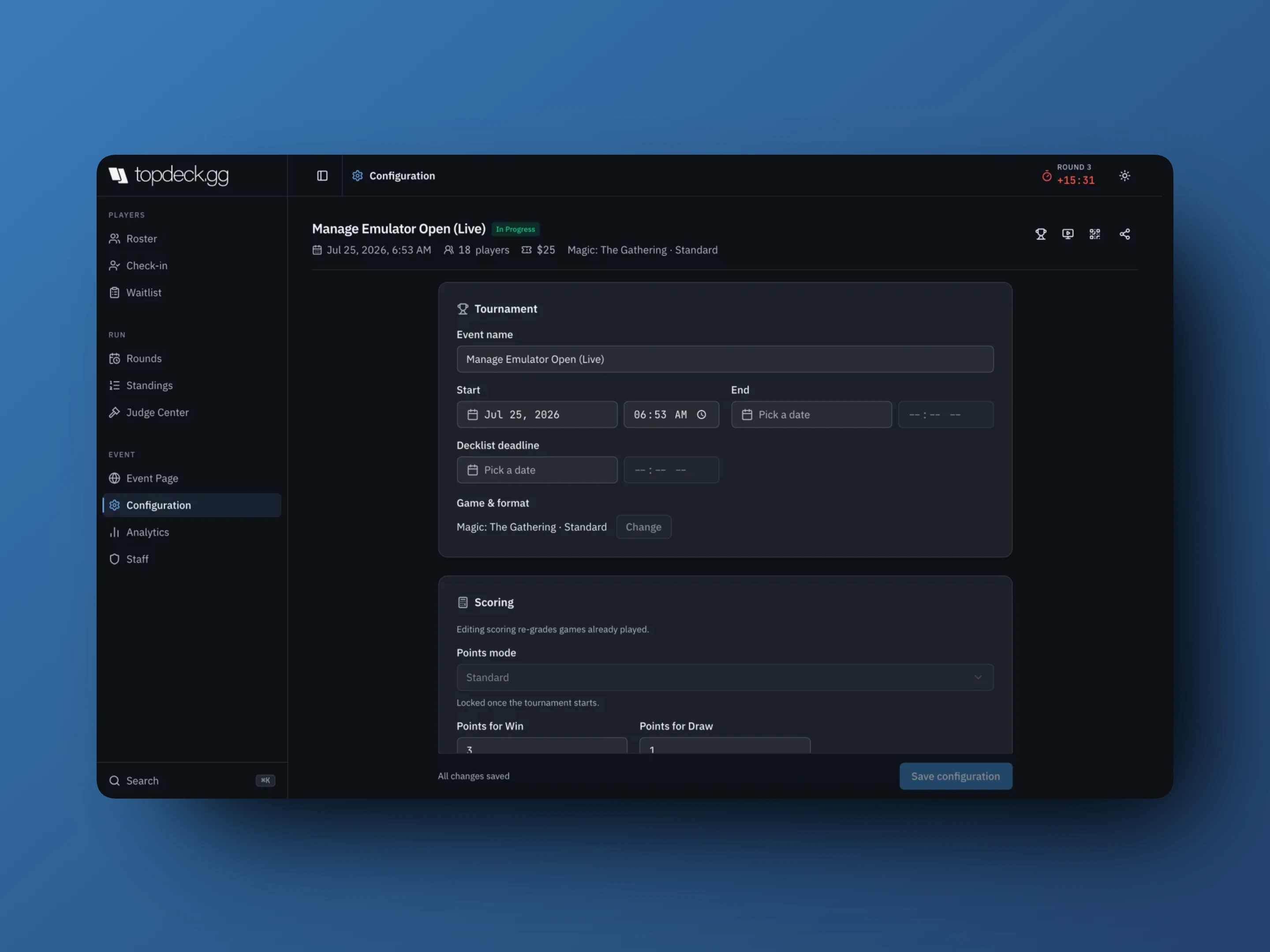
Tournament
- Event name
- Start and End
- Decklist deadline, after which players can no longer edit their list and the roster shows Deck locked
- Game & format. Change opens a confirmation, because switching changes decklist fields and scoring defaults.
Change the game or format before you share the event. Some choices are limited by organized-play permissions on your account.
Scoring
Editing scoring re-grades games already played. That warning is literal: standings for every round recompute against the new values, including finished rounds.
Points mode is the top-level choice and locks once the tournament starts:
- Standard gives points for a win, draw, loss, and bye
- Score Based
- Point Wager lets players wager a percentage of their points per game
- Total Points or Custom Points for multiplayer formats
- Advanced (All Point Options) exposes every field at once
Depending on the mode you get Points for Win, Points for Draw, Points for Loss, Points for Bye, Points for Game Win, Extra Points for Flawless Win, Starting Points, Max Points Per Round, Seat Scaling, Wager Amount, and Draw Wager.
Reset scoring to format defaults puts back the standard settings for the selected format.
Draw Mode decides how a draw splits points: All or Nothing, Custom Percent, or Equal Distribution.
Round
- Round Duration (minutes) sets the starting clock for each round
- Best Of (Games) also decides the quick-result buttons on each table card. Changing it warns you if a recorded result would stop grading.
- Bye Mode, for pods: Allow Byes (No 3 Person Pods), Pair Low Standings into 3 Pod, Pair Low Standings into 5 Pod, Pair High Standings into 3 Pod, Pair High Standings into 5 Pod
- Starting Table Number begins numbering at 101 instead of 1
- Player Identifier is what players are known by: Name (Recommended), Discord ID, Name | Discord, or Magic Online Handle
- Blocked Tables are the table numbers pairings skip, entered as numbers and ranges:
43, 47, 101-110. Changes here apply to the next round you pair. - Draft events add Draft Duration (minutes), Draft Pod Size, and Deck Build Duration (minutes).
Autopilot
Run rounds automatically hands the event to autopilot once round 1 starts. See Running an event for how it plays out.
- Swiss rounds is how many Swiss rounds to play. Auto sizes it from the players in round 1, following the Magic Tournament Rules: 1 round for 2 players, 2 for 3-4, 3 for 5-8, 5 for 9-32 (4 for a 9-16 player booster draft), 6 for 33-64, 7 for 65-128, 8 for 129-226, 9 for 227-409, and 10 for 410 or more. Pod events play 2 rounds for up to 16 players, 3 up to 28, 4 up to 56, and 5 up to 128.
- Top cut is the bracket after the Swiss rounds. None ends the event after the last Swiss round.
- Round start delay (minutes) is the time between publishing a round's pairings and starting its clock, so players can find their tables. It's 3 minutes unless you change it; 0 starts the clock with the pairings.
- Confirm timeout (minutes) appears when Require Confirmation is on. If a player reports a result and their opponent neither confirms nor disputes it within this many minutes, the result counts, so a player who leaves doesn't hold up the round. A disputed result still waits for staff. It's 5 minutes unless you change it; 0 waits for the opponent.
- Start round 1 when self check-in ends has autopilot drop the players who didn't check in and pair round 1 as soon as self check-in ends. Round 1 pairing picks Swiss, or a single elimination bracket of everyone who checked in. Pod events always start with Swiss.
If round 1 is a bracket, Swiss rounds and Top cut don't apply: autopilot runs the bracket to the final.
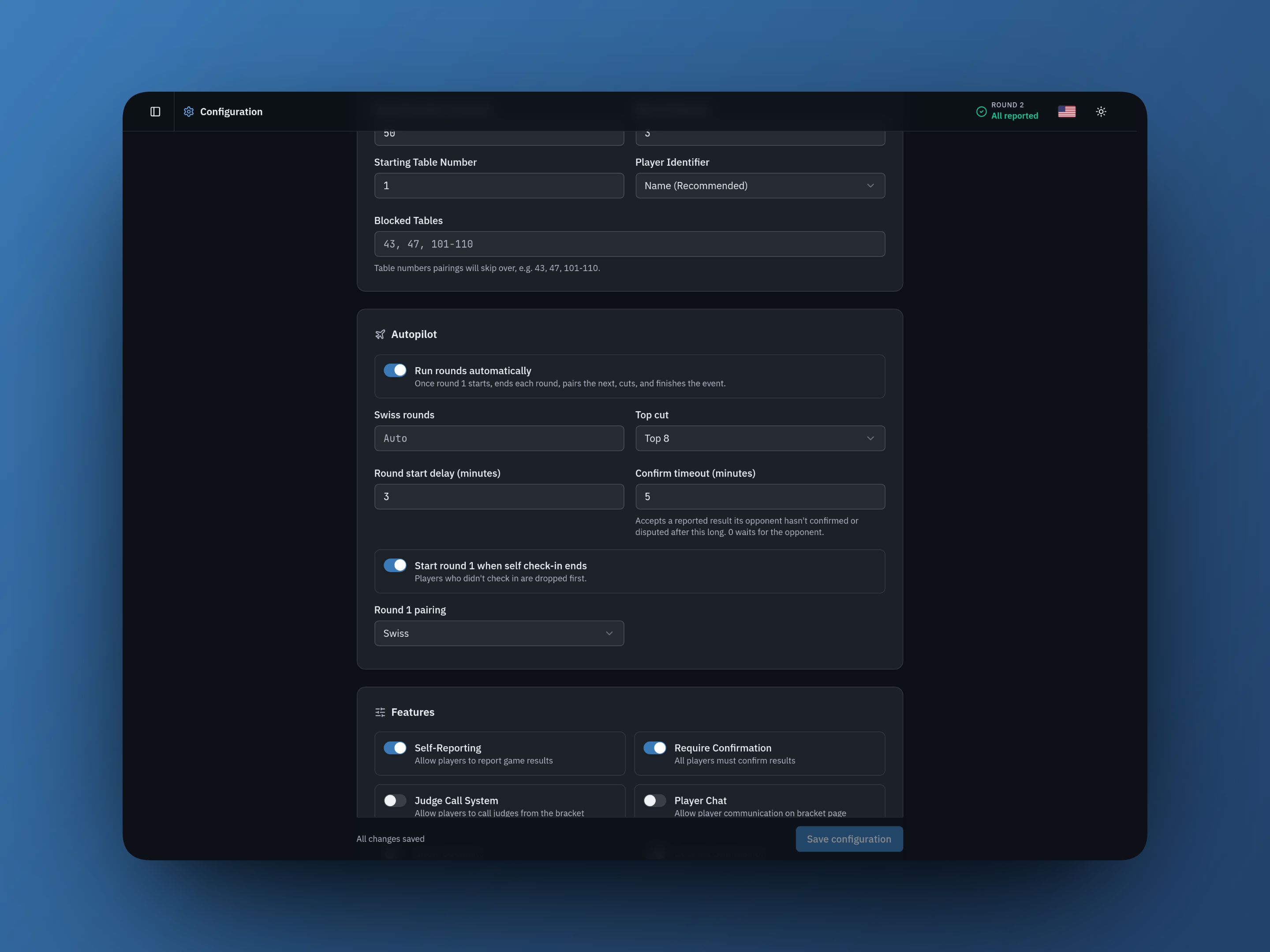
Features
Toggles that change what players can do:
- Self-Reporting lets players report their own game results
- Require Confirmation makes every player at the table confirm the result
- Judge Call System lets players call a judge from the bracket page and the app
- Player Chat turns on table chat on the bracket page
- Decklist Submission lets players submit a list
- Show Decklists makes submitted lists public
- Hide Standings keeps standings out of public view
Require Confirmation needs Self-Reporting on first.
Tiebreakers
Tiebreakers apply in order, top to bottom, after points.
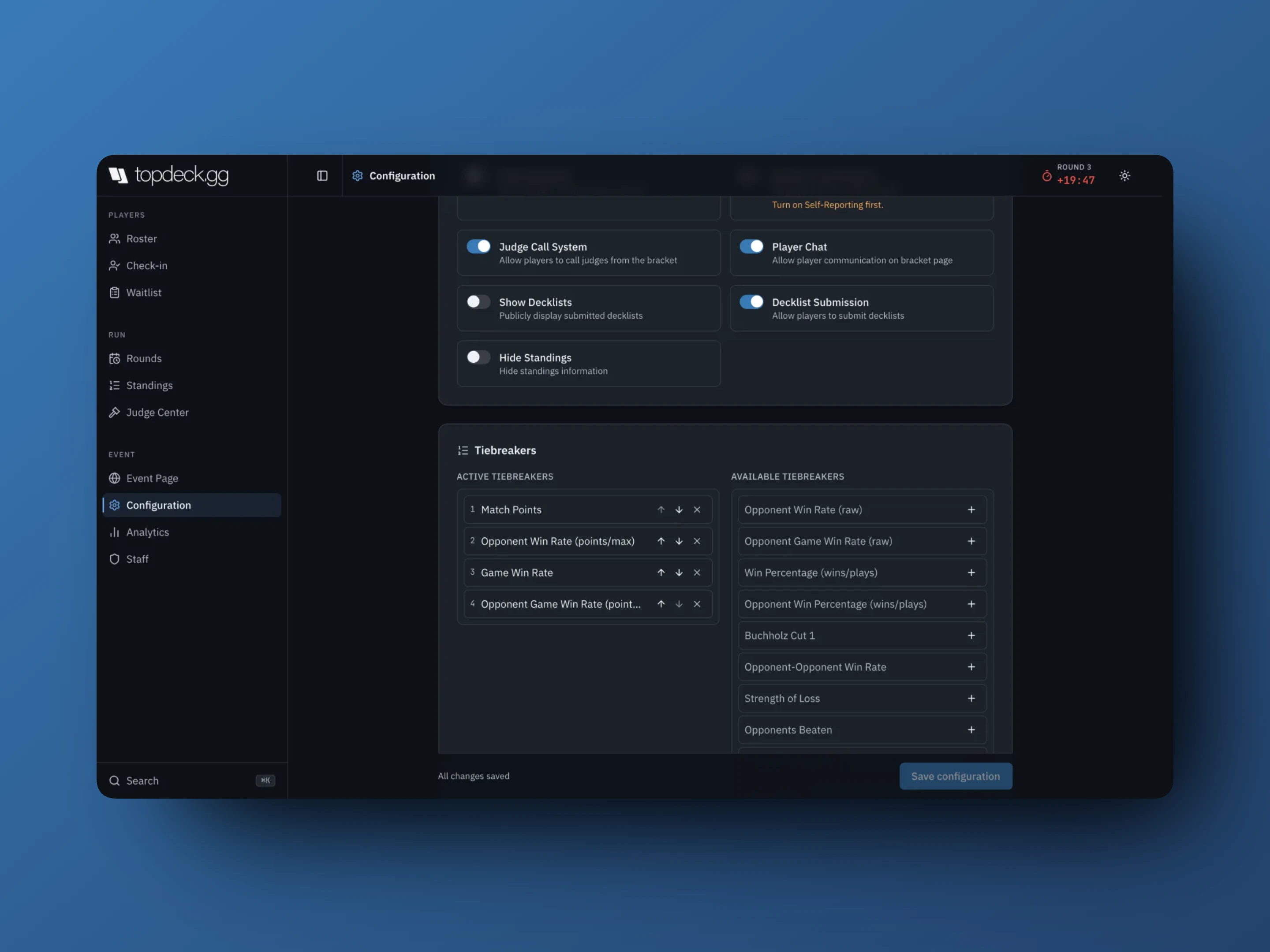
The standard Magic set is already active by default: Match Points, Opponent Win Rate (points/max), Game Win Rate, Opponent Game Win Rate (points/max).
Others you can add, depending on game and event type, include Opponent Win Rate (raw), Opponent Game Win Rate (raw), Win Percentage (wins/plays), Opponent Win Percentage (wins/plays), Buchholz Cut 1, Opponent-Opponent Win Rate, Strength of Loss, and Opponents Beaten.
With no tiebreakers active, tied players resolve randomly. Match the order to the rules document you are running. Publish it too, because this is the setting players argue about.
Team settings
- Team Size is 3 for trios, 2 for a 2v2. Above 1, the Teams section appears in the sidebar.
- Shared Game means the whole team plays one game per round at one table. Off, each seat plays its own table.
- Row Size sets how many tables print per row on the seating sheet.
Team Size and Shared Game both lock once any team exists or the event starts. Set them first. See Running team events.
League settings
Leagues replace round structure with:
- Minimum Games Required, how many games a player needs before they appear on standings
- Seating mode for multiplayer leagues: Weighted Random, High Rank First, or Low Rank First
- Require Admin Confirmation, which makes staff confirm each submitted game
A league needs an end date.
Save behaviour
The bottom bar reports Unsaved changes or All changes saved, with Discard beside Save configuration. Leaving with unsaved edits warns you first.
Several fields lock as the event progresses. You will see Locked once the tournament starts, Locked once a round exists, or Locked once a league game exists under the field rather than a silent failure.
Danger zone
Reset tournament deletes every round, pairing, and result, returning the event to registration. Players and settings stay. It asks you to type DELETE and it cannot be undone.
Before you pair round one
Confirm:
- Every active player is checked in, or intentionally included.
- Round Duration, Best Of, and the point values are right.
- Decklist and team requirements are satisfied.
- Tiebreakers match your rules document.
- Staff roles are assigned.
Then open Rounds. See Running an event.