

In a team event the team is the competitor. Teams are what get paired, what earn points, and what appear on standings. Players are seats inside a team.
That one shift explains most of what looks unfamiliar: standings list Team 1 (Bo Reyes/Cleo Chen/Dev Okafor) rather than three players, and one team match can occupy several tables at once.
Read Running an event first. Check-in, the clock, printing, corrections, and offline behaviour are identical.
Two shapes of team event
Everything else on this page follows from which one you are running.
| Seat tables (default) | Shared Game | |
|---|---|---|
| A match is | one table per seat | one table for the whole match |
| A trios match produces | 3 tables | — |
| Typical format | MTG: Team Trios | Riftbound: 2v2 |
| Result entry | one per seat | one per match |
| Per-seat formats | yes | not used |
Seat tables is the default and the shape this article leads with. Shared Game is a single switch in Configuration, covered further down.
Set it up in the right order
Team settings lock as soon as teams exist or the event starts, so sequence matters.
- Configuration → Team settings → Team Size: 3 for trios, 2 for a 2v2.
- Teams → Formats for the per-seat formats, if your event uses them.
- Teams, to build the teams and assign players.
- Only then open Rounds.
Team Size and Shared Game are disabled once any team exists, and the field tells you so rather than failing silently. To change either, delete the teams first.
Two more things worth knowing before you start:
- The Teams section does not appear in the sidebar until Team Size is greater than 1. If you cannot find it, that is why.
- Teams needs Head Judge access or higher.
Build the teams
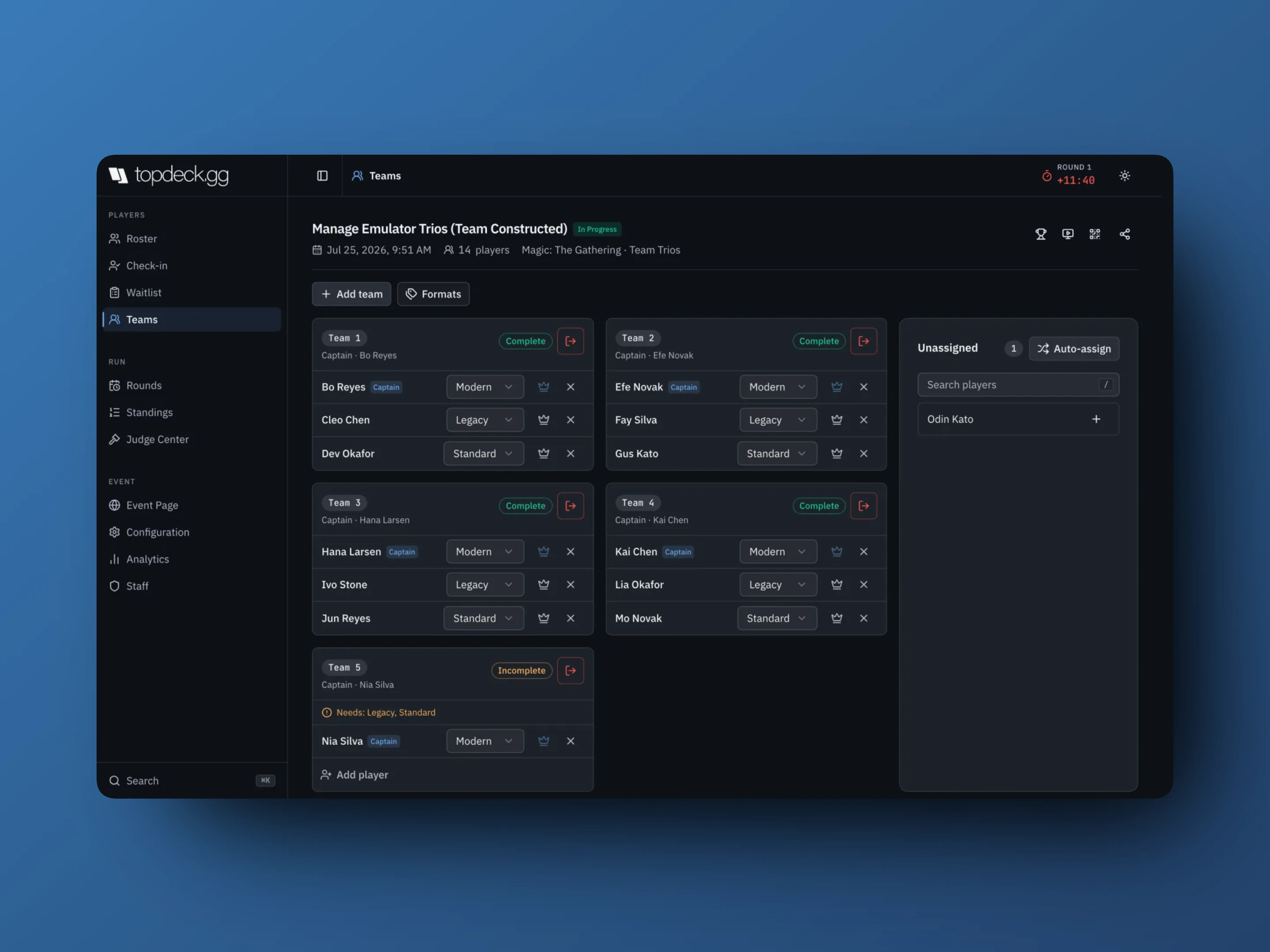
- Add team creates an empty team. Auto-assign builds teams out of everyone in the Unassigned column.
- Add player fills an open seat from the roster; the + beside an unassigned player does the same thing from the other direction.
- The crown makes that player captain; the × removes them from the team.
- The button in a card's header changes with the event: before the event starts it is Delete team, which removes the team entirely and moves the teams after it up one number. Once the event has started it becomes Drop team / Undrop team, which keeps the team and its results.
- A team short of a seat is Incomplete and names what it still needs, as in Needs: Legacy, Standard.
Players register normally on Roster first. Teams are built from registered players, not instead of registering them.
Two roster interactions that catch people out:
- Deleting players from Roster skips anyone holding a team seat. Remove them in Teams first.
- An Incomplete team does not play. The pre-pairing check on the round page says so: N teams are missing players and will sit out this round.
Set the seat formats
Trios events give each seat its own format. Formats opens the editor.
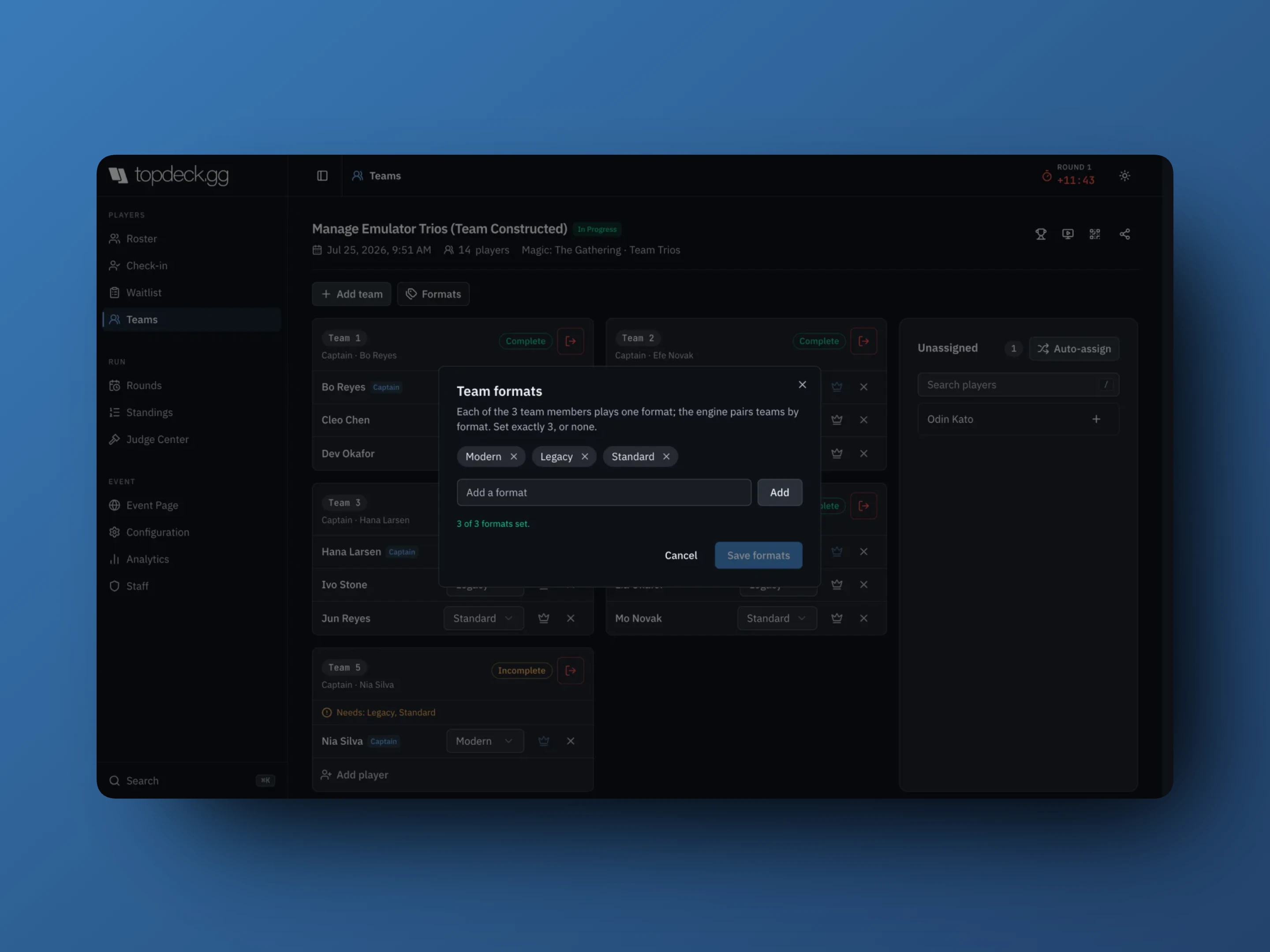
The rule the dialog states is the one that matters: the engine pairs teams by format. The Modern seat plays the other team's Modern seat, Legacy plays Legacy, Standard plays Standard.
So a seat's format, not its position on the card, decides who it plays. Formats must be unique within a team, and changing one player's format when a teammate already holds it swaps the two.
Set exactly Team Size formats, or none. Three formats on a trios event is valid; two is not. With no formats set, teams simply pair without them.
Each seat's format shows in a dropdown on the team card, so you can reassign a player to a different format without rebuilding the team.
Run a round of seat tables
Pair as usual, with New round → Swiss (recommended). Teams are paired against teams; the seat tables come out of that.
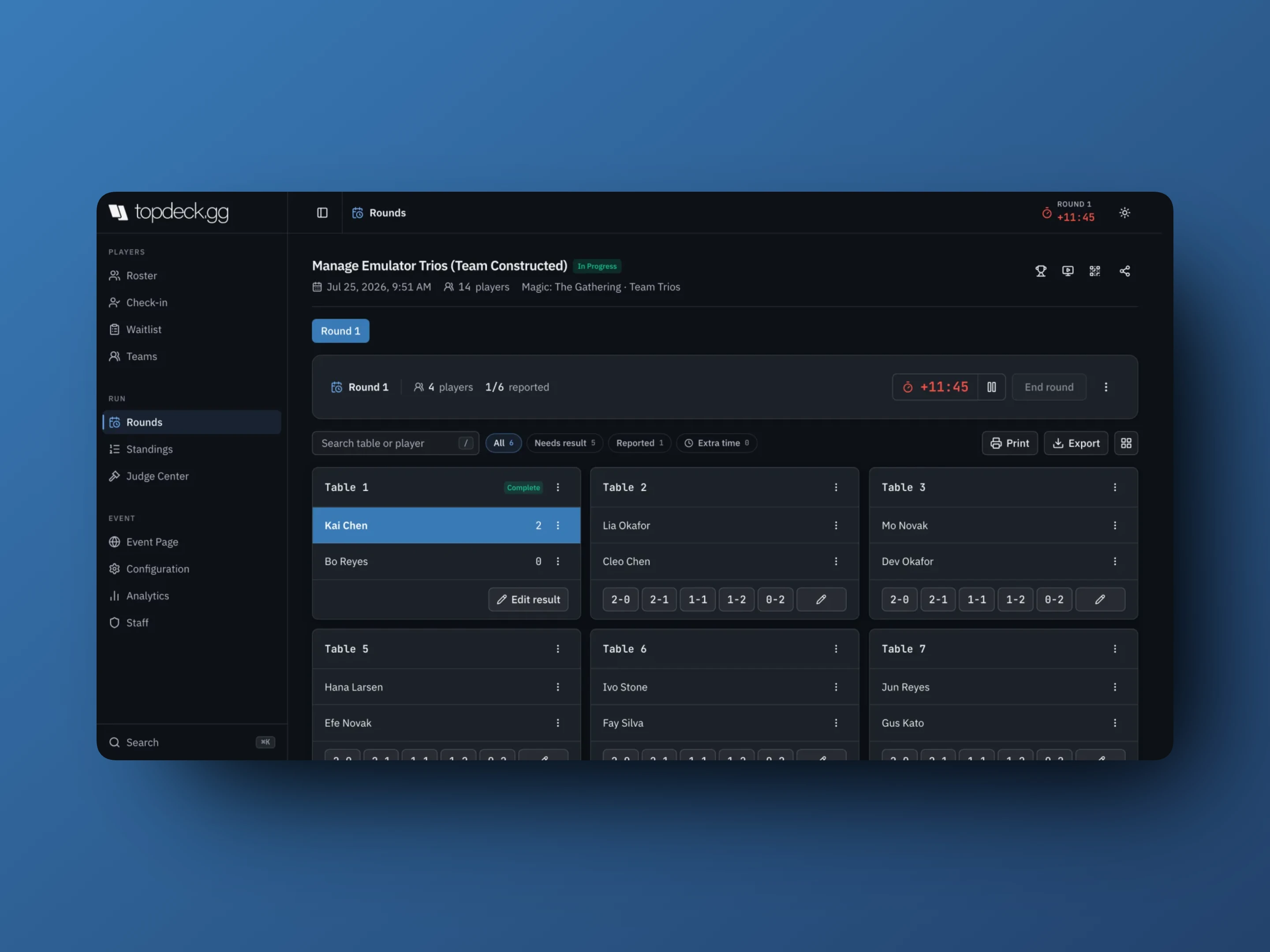
- Each seat table is entered like any other table: the quick-result buttons from the event's Best Of, or the pencil for a custom result.
- Each seat is one game in the team's match. The team that wins more seats wins the match, so a trios match is decided 2–1 or 3–0.
- A clean sweep is recorded distinctly from a 2–1, which matters if you have set Extra Points for Flawless Win in Configuration.
- The round counter counts tables, so a trios round of four teams reads
1/6 reported, not1/2. - Needs result still finds outstanding seats, and End round stays disabled until every seat table has a result.
Table and seat menus behave exactly as they do in a solo event: extensions, deck checks, penalties, messages, drops.
Editing pairings takes care. A team match spans several tables, so moving one seat is not enough: move the team on all of its tables. If you save a change that would leave a team facing two different opponents, the editor refuses and tells you which team is split.
Run a Shared Game round
Turn on Shared Game in Configuration → Team settings: whole team plays one game per round at one table. This is the Riftbound 2v2 model, with two players sitting down together against two others.
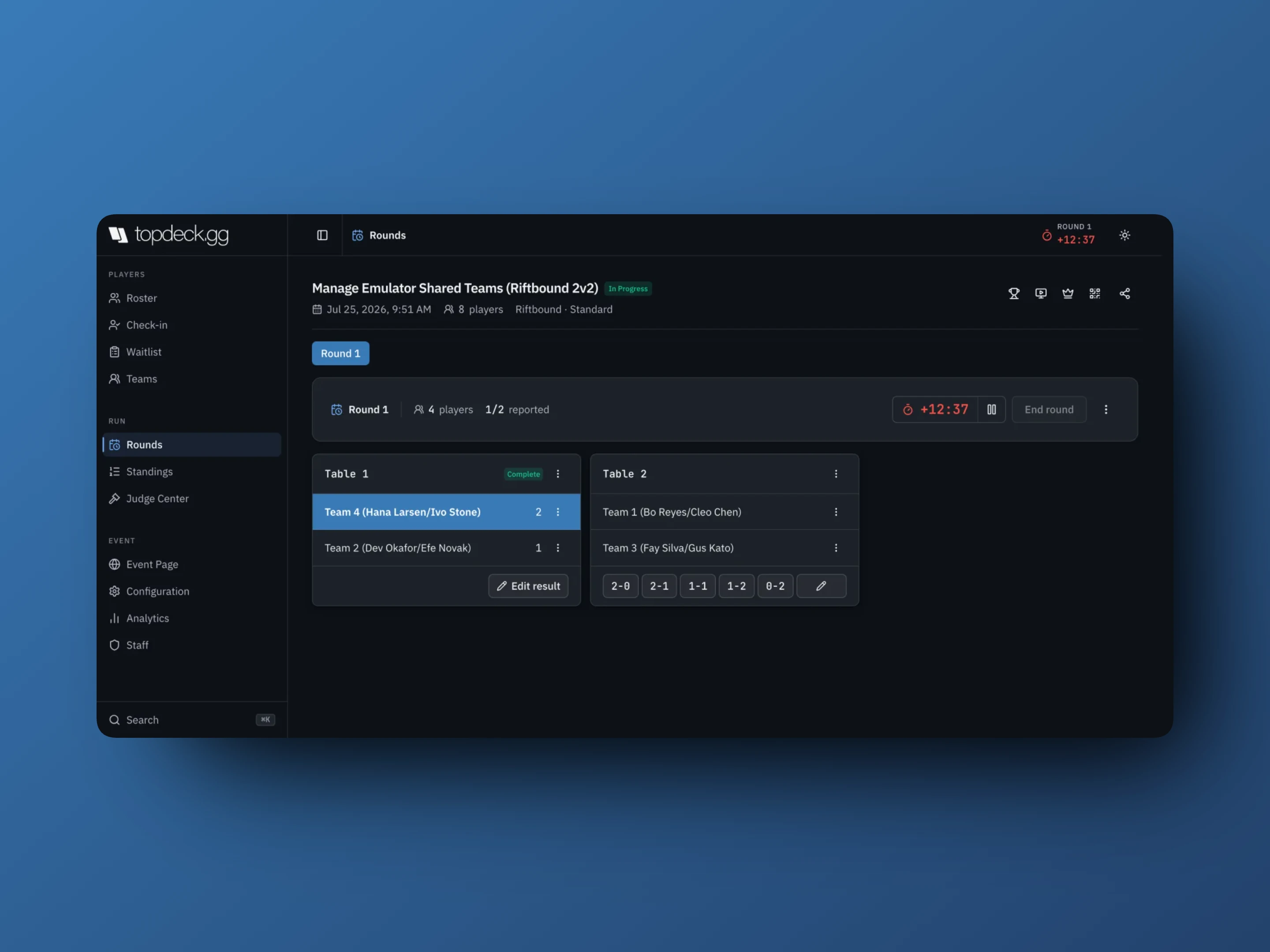
- One table per match, both sides named as teams with their members.
- One result per match, using the same quick-result buttons, entered once.
- Seat formats are not used. Every member of the team is at the one table.
- The round counter matches the number of matches, so four teams read
1/2 reported.
Everything else is unchanged: clock, extensions, deck checks, printing, drops.
Standings and the cut
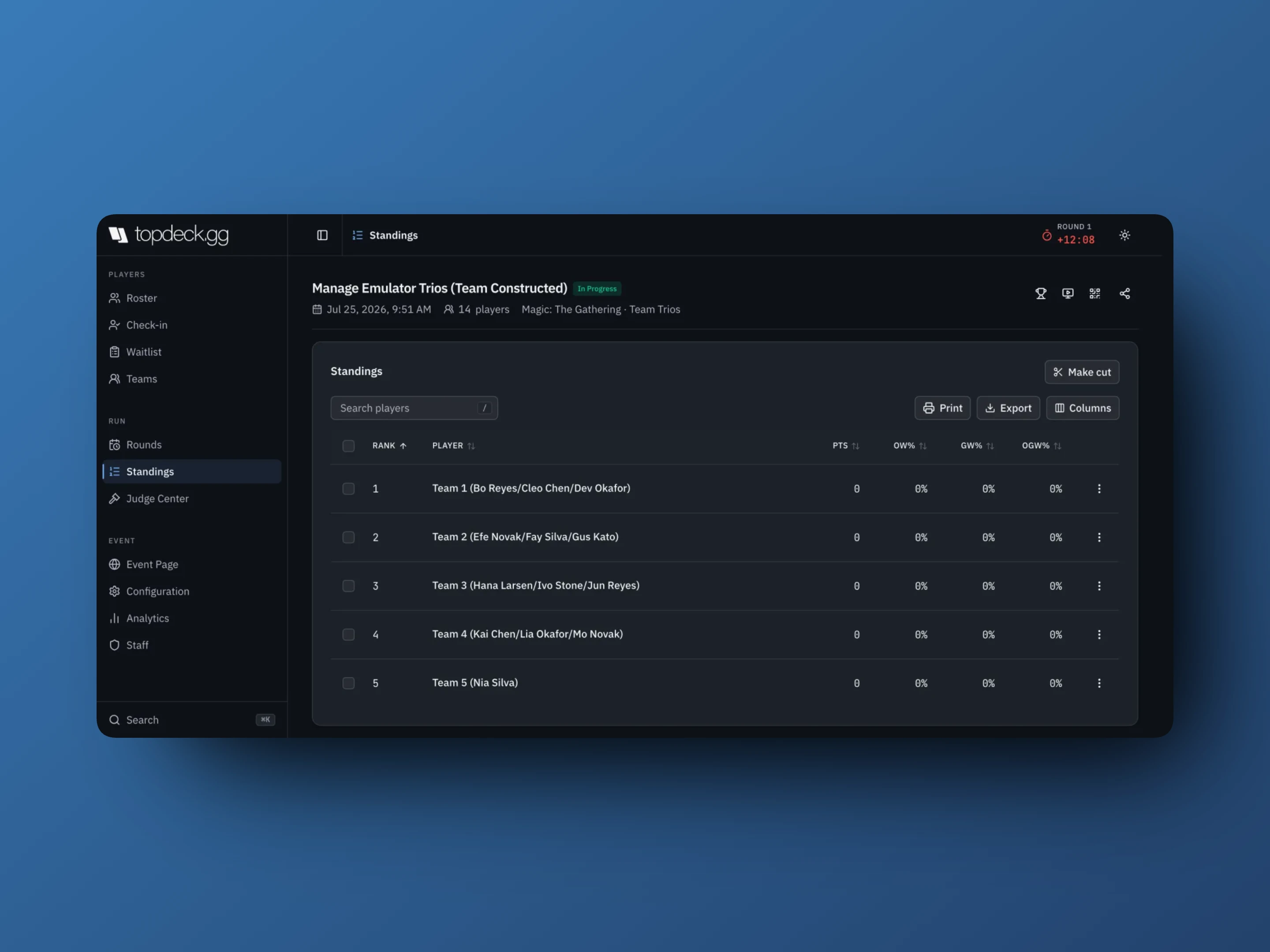
Points and tiebreakers work as usual, applied to teams. Make cut advances teams, and the players on a cut team go with it.
Brackets, printing, and exports all treat the team as the entity, so match slips and seating sheets are produced per team match.
What players see
A player on a team sees their team, their teammates, and their own seat's pairing, on the bracket page and in the app, where Manage Team shows the roster they belong to.
Where your event uses formats, tell players which format each seat is playing before round one. Their pairing shows the opponent, not the reason they were matched.
Things that go wrong
The Teams section is missing
Team Size is still 1. Set it in Configuration → Team settings, and confirm your role is Head Judge or higher.
I cannot change Team Size or Shared Game
Teams already exist, or the event has started. Delete the teams to unlock both.
Auto-assign will not run
Set exactly Team Size formats first, or clear them entirely. Auto-assign needs a complete format list to seat players against.
A team did not get paired
It is Incomplete. Fill the seat, or accept that it sits out. The pre-pairing check names how many teams are affected before you pair.
A player cannot be deleted from the roster
They hold a team seat. Remove them in Teams, then delete them.
The round shows more tables than matches
That is a seat-tables event working correctly: one table per seat, several tables per team match. If you wanted one table per match, you want Shared Game.